Small improvements, more time breaking bricks. Here's what changed in Super Brik Brik.
/ RELEASE 1.4.3
More time to keep your streak
You now have 48 hours between clears to keep your streak. Streaks of five or fewer stay at their current level when time runs out.
If you lose a longer streak, Reddie will tell you how to recover it. Clear a level on five consecutive days to restore your previous streak. Missing a day restarts the five-day count.
Reddie's optional €0.99 Streak Shield protects your streak for 30 days and grants one hour of PRO. Buying it during recovery restores your streak immediately.
Community stars are temporarily waived for skill-tree unlocks and upgrades.
Our playful red mascot is ready to bounce into the action. Look for Reddie in the tutorials. He'll have special quests for you, with a surprise waiting when you complete them!
Change your display name from the Account screen. On Steam, the game uses your Steam profile name.
Active play streaks appear on the leaderboard automatically.
Endless resumes at your saved stage after you reopen the game.
Orb packs grant only the Orbs shown in the store. Briks are available in their own packs and eligible bundles.
The campaign now reaches level 840, with new levels from 241 through 840 and a whole range of brick mechanics to discover.
Meet fountain, regenerating, guardian, twin, moving, portal, phase, bumper, slope, diamond, bar, pulser, splitter, gravity well, switch and gate bricks.
Switches open linked gates, gravity wells bend ball paths, and splitters make extra balls. Each mechanic has its own campaign levels and editor support.
Build denser boards and unlock special brick brushes with Orbs in the editor.
Endless progression has updated rewards and daily quest goals.
Paddle exhaustion now targets sustained rapid left-right spamming, with a gradual slowdown and faster recovery.
Reinforced and steel bricks arrive in campaign levels 161–240. Add both to your own levels with the free editor brushes.
Reinforced bricks
Every hit, blast or laser deals one damage to a reinforced brick. Piercing balls bounce off its plating.
Levels 161–200 now use reinforced bricks. The coloured face shows the hits left, inside an armoured frame.
The plating appears on the 3D cube and in the matching 2D and editor drawings.
Steel bricks
Levels 201–240 now include steel blocks. Balls bounce off them, lasers stop at them, and explosions leave them standing.
Break the other bricks to finish the level. Steel is excluded from the bricks counted for completion and star goals.
A first-time hint explains each new brick.
Build your own levels
Apply the free Reinforced or Steel brush to a placed brick, or use its switch in Properties.
The editor marks bricks sealed off by steel and asks you to leave a gap before Test Play or Publish.
Regular collection art
Regular collection models and preview images now use the matching Steam collection designs.
/ RELEASE 1.3.9
Monthly Endless boards and new quests.
Endless Run now has a shared monthly leaderboard and a monthly set of community levels. New campaign and skill quests join the daily board, alongside changes to paddle movement, combat damage and late-game packs.
Endless Run
Compare your stage and rank on this month’s board or the previous month’s results. Reach stage 10 to qualify for final-rank Brik rewards when the month ends.
Play a community level every fifth stage, from the same monthly set for everyone. The set runs from easiest to hardest, then repeats.
A run from the previous UTC month ends after its current stage. Records and earned rewards are kept.
Quests and campaign progress
Daily quests can ask you to reach a campaign level, earn three stars, finish a skill upgrade, or get the “That was awesome!” screen.
Quest EXP scales with your level, and claiming it applies earned level-ups immediately.
After finishing the campaign, Next finds the next one-star level, then a two-star level. Once every level has three stars, it continues in order and wraps from level 400 to level 1.
Brick-hit EXP on a replay falls to 10% when that level’s Orb reserve is drained, using the existing reserve refill.
Controls, damage and the shop
The paddle follows input instantly for every player. Kinetic Control becomes Exhaustion Resistance, with existing upgrade tiers preserved.
Explosions deal 1–3 damage according to distance. Damage Core upgrades lower the speed needed for full damage, reaching 70% of maximum speed at the top tier.
The Orb feathering area grows with ball speed and keeps its size through magnet catches.
Like or dislike a community level from the pause menu. Video skills are labelled Mobile only.
Pack contents keep growing between 600 and 1,200 campaign stars. Late-game Orb packs can also include Briks. The shop shows the quoted contents before payment.
40 campaign boards between levels 58 and 99 now use themed pixel-art layouts, including a wand, key, anchor, bell, sailboat and target. Levels 67 and 70 keep their existing layouts.
Eleven achievement goals return to the in-game board, bringing it to 75 claimable achievements.
Quest progress refreshes after rating or publishing a level.
The “That was awesome!” effect includes timed impacts, shockwaves and confetti.
Background textures use filtering and mipmaps to reduce jagged edges.
Queued community reports stay tied to the account that created them.
Ball and paddle skins have fresh textures, many with animated finishes. Backgrounds gain depth and movement while respecting your background motion setting.
Magnet-held large balls clear the paddle so their launches follow the aiming guide.
Finish a campaign or community level with the “That was awesome!” callout to earn three stars, even after a revive.
The Sniper aiming line stays steadier while Piercing breaks through bricks.
Super Brik Brik gets a broad UI refresh with chunky buttons, clearer cards, redrawn icons and animated reward feedback.
A redesigned home screen and level select put your next game within easier reach, with larger controls and consistent Back buttons.
Win, game over, pause and Endless screens bring progress, rewards and your next action into clearer view.
Quests, achievements, daily drops and account screens have cleaner cards and reward counters. Claiming quests keeps your scroll position.
Cosmetics use rarity frames, ownership badges and clearer Open and Equip actions. Crate openings have a full-screen reveal with wider framing for paddles.
Community levels, statistics, the store, upgrade choices, skill details and the level editor share the new design. Reports use reason chips, and editor tools have larger touch targets.
A new animated title and a longer glowing gold aiming guide add more character. Menu, skill, power-up and achievement icons have been redrawn.
Failed or partial donations return all reserved Briks. Daily-drop claims made during a refresh are queued, popup dismissal stays within the popup, and pause-menu Restart and Quit actions ask for confirmation. New interface text is translated across all 31 supported languages.
Tidal Observatory
Tidal Observatory joins the collection lineup with eight ball skins, four paddles and two backgrounds, plus a matching crate and hammer. Its Steam items join the existing daily reward pools: a crate after 10 active minutes, and a hammer key after any seven claimed crate days. Matching designs are also in the regular cosmetic catalog.
Bring pearl, turquoise and coral to your next run. Tidal Observatory adds eight balls, four paddles and two quiet backgrounds, with a matching dive mallet and four-piece porthole crate.
Roll with Pearl, Compass Float, Nautilus, Sea Urchin, Tide Buoy, Coral Bloom, Diving Bell and Glass Float.
Mix in Coral Arc, Submarine Deck, Shell Bridge or Wave Rider paddles.
Set the scene with Kelp Current and Bathymetric Lines.
Find the new set in Customize. The regular Game Collection uses its own crate drops and hammers, with the same prices and opening odds as before. Your existing cosmetics and progress stay intact.
October 23 refresh: The Steam Super Giveaway now has a live countdown, clearer entry requirements and ticket progress, and a refreshed prize panel. Your entry and earned tickets stay intact. Entry availability continues to follow the server.
Open Settings > Audio and turn on Mute music when unfocused. Music becomes quiet when you switch to another window or browser tab and returns when you come back.
The option starts off and remembers your choice. Your chosen music volume and existing mute preference are preserved.
Steam hammer keys now unlock for every seven daily crates you claim. Start on any weekday, miss a day, or take a break: claimed-day progress carries into the next week without resetting.
Previously claimed crates from incomplete weeks count automatically, with days already used for a delivered or pending key deducted. A daily crate still requires ten minutes of active gameplay and a claim. The drops screen shows progress toward the next key and any ready keys.
This update is for Steam on Windows, Linux and macOS. Existing inventory, reward choices and crate-opening rules are preserved. Browser and mobile versions do not use Steam inventory drops.
Magnet-caught balls release into the confirmed Ode finale before the paddle drops. Escape and other pause requests no longer interrupt the finale.
First-serve guidance explains that holding makes the arrow move and releasing shoots where it points. The browser controls guide uses the same instructions.
This browser update also includes clearer community-report feedback, Tab navigation in report forms, and recovery for optional usage uploads after interrupted connections.
The community report form now explains when you cannot report your own level. Tab moves out of the optional details field, while Enter still starts a new line. You can reach Cancel and Send Report without getting stuck in the text box.
If you choose to share usage statistics, uploads now resume after a prolonged connection interruption without restarting the game. Sharing remains optional and off by default.
Your Midnight Carnival collection, progress and owned items stay available.
Dress your next run in lantern amber, ivory masks, purple ribbons and teal parade decorations. Midnight Carnival adds eight ball skins, four paddles and two backgrounds, with a matching hammer and four-piece crate.
Find the regular collection in Customize. Its crate joins the regular gameplay-drop pool and uses your regular cosmetic inventory. Steam's Night Parade collection has separate Steam inventory ownership and joins the daily crate and weekly matching-hammer reward pools.
Steam daily crates still require ten active minutes, and the weekly hammer still requires all seven daily claims in the same UTC week. The new theme is one of eight equally likely collections. Each collection keeps its existing opening odds.
Bright ball details and restrained backgrounds keep the new designs readable in play. Themed crate and hammer opening models are included in the 1.2.4 client.
Report a community level from either result screen, including a community daily challenge. After a loss, Report sits alongside the existing Like and Dislike buttons, so you can share feedback without finding the level again.
The report follows the board and published revision you actually played. You can close the form or restart while it sends. The form also fits correctly when first opened in a narrow window.
Repeated Restart or Menu presses now trigger one scene change. Restart callbacks ignore a level that has already closed, and repeated result actions no longer repeat end-of-run handling.
Community daily challenges now remember which levels have appeared before. The rotation favors less-used levels and avoids the previous seven days when suitable alternatives are available. Smaller pools still get a daily level.
Once selected, a daily level keeps its saved layout for that day, even if its creator edits the original. Today's existing level, your saves, rewards and streak rules are preserved. A removed level stays unavailable.
See the missing download size before adding music, level updates or cosmetics. Choose Download, or select Not now and start playing with the content already included or cached.
The prompt fits narrow screens and longer translations. Approved extra downloads can finish in the background. Skipping downloads preserves your saves and owned items, and all 400 campaign levels are included for offline play.
Like or dislike a community level after a loss, including a community daily challenge. Your existing vote stays selected, and you can change it before restarting or returning to the menu.
Feedback after a loss gives no extra Orbs and leaves your once-per-level rating reward available after a win. Existing votes and reward claims are preserved.
The campaign doubles to 400 levels. Levels 101 to 200 are redesigned and levels 201 to 400 are new: thirty worlds of ten levels each, from Kitchen Counter to Myth and Legend, where every level is a picture made of bricks.
Some bricks hold a power-up and show which one: each hit releases a capsule until the brick is empty. Other bricks stay invisible until the ball finds them, and explosives clear everything around them. Earlier levels now introduce all three.
The skill tree is redesigned for phones, tablets, desktop and controllers, and the store now closes with a controller's back button. Power-up pickups have new models.
Level loading now keeps frequently used resources ready and warms up common effects before play, reducing repeated loading work and first-use stalls. Exported downloads also include fewer unused resources. The level-selection page dots are centered below the grid.
The campaign doubles to 400 levels. Levels 101 to 200 are redesigned and levels 201 to 400 are new: thirty worlds of ten levels each, from Kitchen Counter to Myth and Legend, where every level is a picture made of bricks.
Some bricks hold a power-up and show which one: each hit releases a capsule until the brick is empty. Other bricks stay invisible until the ball finds them, and explosives clear everything around them. Earlier levels now introduce all three.
The skill tree is redesigned for phones, tablets, desktop and controllers, and the store now closes with a controller's back button. Power-up pickups have new models.
Levels load faster and the first explosion or power-up of a run no longer pauses the game. Downloads are smaller on every platform.
Brick impact spins now update each rendered frame in Safe graphics mode, making their turns smoother on mobile and in the browser. Safe mode keeps its existing resolution and lighting limits.
Dense boards reuse unchanged brick transforms, reducing repeated presentation work while preserving colors, shadows, hit effects and normal ball collisions.
On desktop, choose Windowed, Fullscreen or Borderless Fullscreen in Settings > Graphics. F11 or Alt+Enter switches fullscreen on or off, and the game remembers your choice.
Make your next run a little more mechanical. Clockwork Foundry adds eight balls, four paddles and two backgrounds with brass gears, copper coils, teal enamel and pressure gauges, plus a matching 3D case and hammer.
Find the regular collection in Customize and through the existing crate rewards. Steam has its own inventory collection, matching hammer and daily-drop selection. The daily crate requirement remains 10 active minutes and the weekly hammer requires seven daily claims.
Exhaustion builds more slowly during repeated fast paddle movement, recovers faster, and causes less slowdown. Ordinary movement keeps its usual responsiveness.
Dense boards now skip finale trajectory checks that cannot clear the remaining bricks within their prediction limit. This removes unnecessary prediction work while keeping normal ball collisions and the final-brick sequence.
Mobile menus also keep their safe-area alignment after screen transitions.
Ode Outer Resonance upgrades now raise the three-star target by the same persistent outer bonus. Each +0.01x tier adds 1% to the original target, rounded up. A target of 1,000 becomes 1,010 after one tier and 1,050 after five tiers.
The target stays fixed while you play a board. Campaign and community levels use the same rule. Your earned stars stay saved, and the two-star target remains half of the three-star target, rounded up. Inner and center Ode upgrades and temporary Golden Crescendo bonuses do not raise this target.
When the golden paddle catches Paddle Size Up, it now gets wider too. Its collision area grows with it, and its movement keeps the larger paddle inside the walls.
The boost uses your skill's usual strength and duration. Another pickup refreshes the timer without stacking extra size. Hits still shrink the paddle underneath the temporary boost, and the normal paddle keeps its own boost when it catches the pickup.
Laser shots now start inside the paddle's ends, so both beams stay in the playfield when you move to either wall. The shot positions follow your current paddle width, including Paddle Size Up.
See more of your collection and give your level more room. Compact menus keep previews, progress and useful actions together.
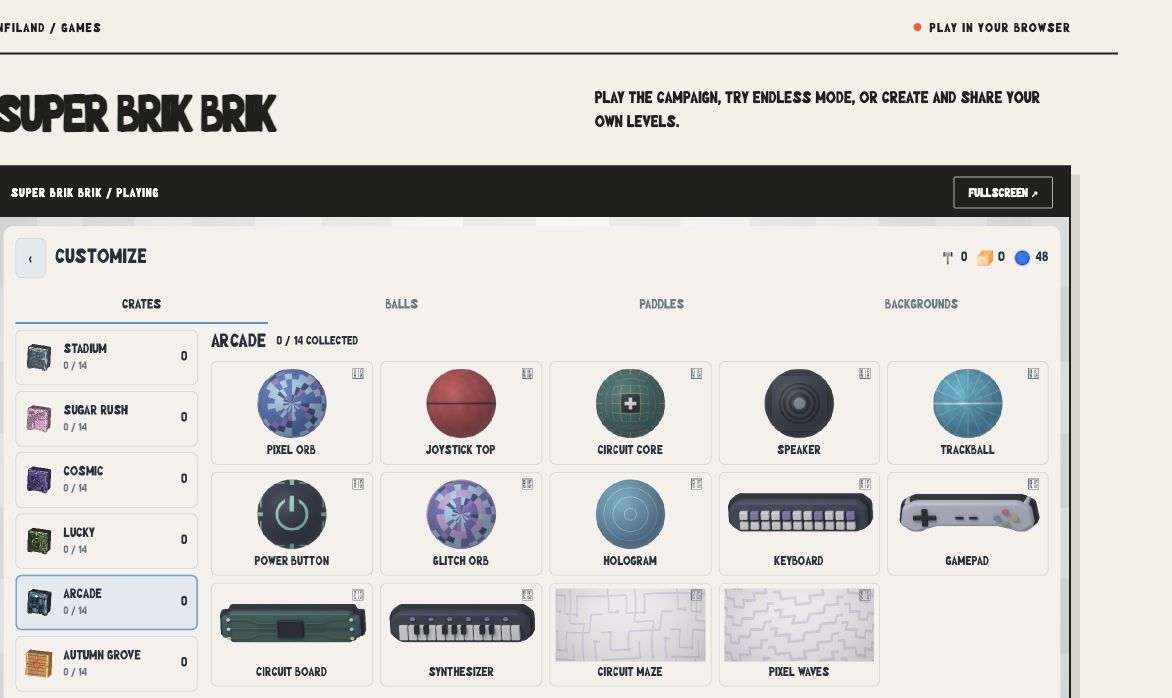
A collection rail, compact item grid and actions for the selected item.
More collection on screen. Browse compact collection tiles and use the preview and action area for the selected item. Community cards put level names first.
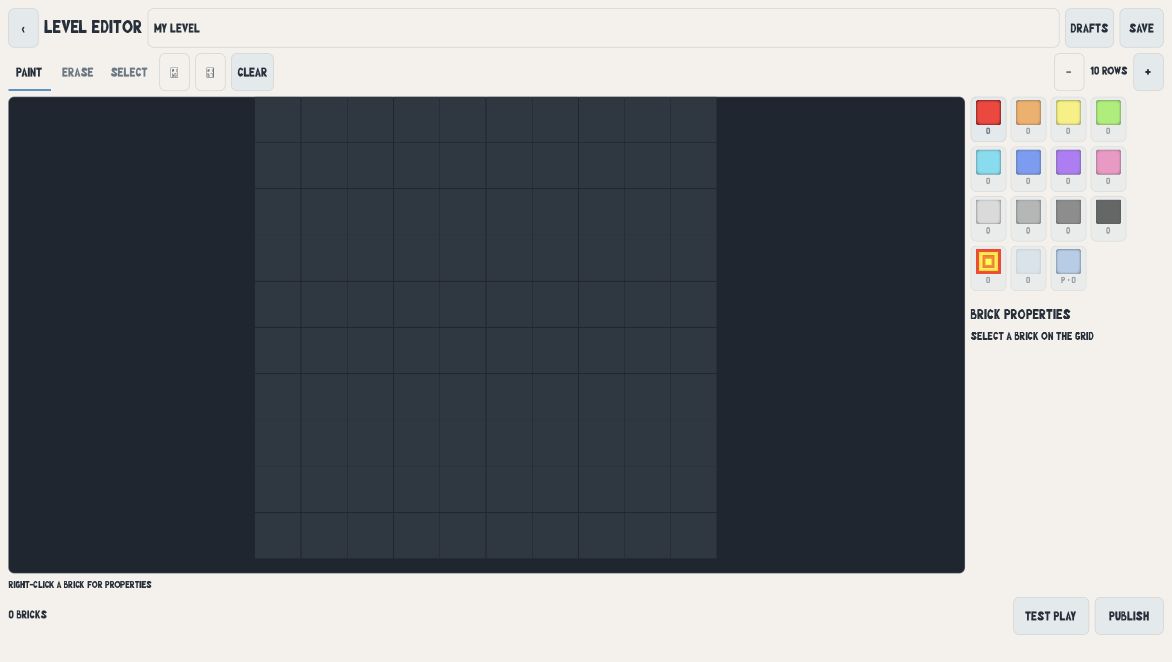
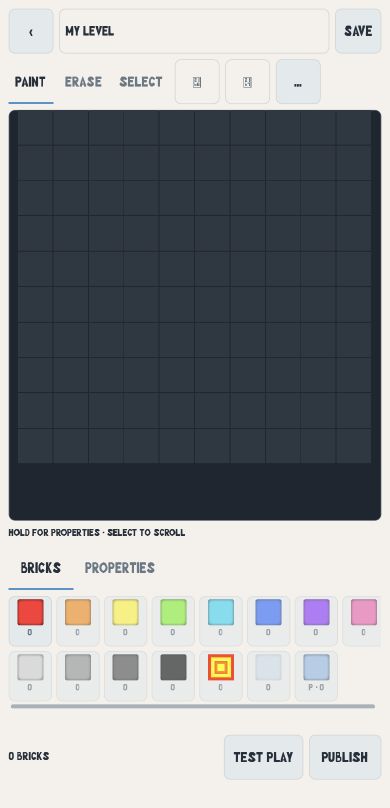
An editor that fits. Desktop gets a canvas and sidebar. Phones get a compact panel below the canvas, with Paint, Erase, Select, undo and redo.
More ways to build. Place invisible bricks and configure power-up overlays using your unlocked skills and editor inventory. Each hit drops one configured power-up until the authored drop count runs out.
A smaller first download. Prepare the audio needed to start playing, then download the remaining soundtrack in the background.
Details that fit. Play streaks have a Settings page and an optional public leaderboard. Countdown text, skill notices, menu spacing and credits have been updated. All 75 Steam achievements have matching current artwork.
On desktop, brick inventory and properties sit beside the canvas.At narrow widths, the brick palette moves below the canvas and Test Play stays within reach.
Instructions should help you play without covering the board. This update makes the first launch hint lighter and brings rows of text closer together.
A text-only start. Your first launch hint sits below the paddle with a clear outline. The bricks and aiming arrow stay visible, and the hint disappears when you launch.
More comfortable spacing. Labels use compact spacing with the same Opsilon font. Every bundled language keeps its glyphs and the room its actual letters need.
Readable achievement cards. Achievement descriptions use the same spacing fix instead of an extra negative gap.
See the crate before opening. Crate details now show a real 3D preview while keeping the contents and chances readable.
Matching designs. Stadium, Sugar Rush, Cosmic, Lucky and Arcade use their collection's 3D crate and hammer designs in the Game Collection opening view. Autumn Grove also has matching opening props.
Recognize your collection. The five original crate icons now match their 3D designs. This catalog artwork update also reaches compatible existing clients.
Fourteen new skins. Eight balls, four paddles and two backgrounds bring acorns, maple leaves and soft forest colors to your game.
A new crate to earn. Autumn Grove joins the five existing Game Collection crates with equal drop weight. Each collection now has a one-in-six chance when a general crate drops.
The same opening rules. Use one regular hammer to open a crate. Regular hammers still cost 2 Briks. The new crate shows every item's chance before opening, and your existing inventory is preserved.
Steam Daily Drops are live. Play for 15 active minutes in a UTC day, then claim a random crate from the main menu. Complete seven delivered daily claims in the same Monday to Sunday UTC week for a weekly hammer key.
Clear reward progress. The Steam drops screen adapts to the available space and shows connection progress or errors. Steam rewards can connect independently of your selected cloud save.
The latest shared game build. The browser game and desktop downloads now use version 1.0.7. Your existing progress and saved audio settings are preserved.
Steam, this website and itch.io use version 1.0.7. GX.games has activated package 1.0.7.0. Google Play now lists the Android 1.0.7 update. iOS 1.0.7 (17) has been submitted to Apple; its public release is pending. Daily Drops and giveaway entry are exclusive to Steam on Windows, Linux and macOS.
Play the Steam version of Super Brik Brik from October 2 through October 25, 2026 for a chance to win The Colorful Creature. Free entry. Entries close at 23:59 Belgrade time on October 25.
Open the present in the Steam main menu for live entrant counts.
Use Steam on Windows, Linux or macOS. Your Steam account must be at least 30 days old.
Play for at least one hour and reach campaign stage 20. Update to version 1.0.5 or later, then open the present button, read the rules and press Enter giveaway.
Everyone starts with one ticket. After 100 TCC-key entrants join, each extra active hour after entry and the bonus unlock adds a ticket, up to five total. Menus, pauses, idle time and purchases do not add bonus tickets.
See your chance in the game. The percentage describes the draw with the current entrants and tickets. Up to 100 different accounts win TCC keys; if 100 or fewer eligible players enter that pool, they all win.
Already own TCC? You enter a separate pool for possible Asteroids ++ DLC or TCC Donation Pack rewards. Alternative prizes and odds are pending confirmation and do not consume the 100 TCC keys.
Play fairly. Cheating leads to disqualification. After the draw, return to the present to see your result and privately reveal your key if you win.
Straight into level one. New players begin with the first level and a short aiming guide. Returning players keep their progress.
Hold, aim, release. The browser's control instructions now match the game: hold and drag to aim, then release to launch. On a keyboard, hold Space and release it to launch.
A quieter start. Default game audio starts at 50%. Your saved volume settings are preserved.
Learn the game first. Optional video bonuses between levels appear after you unlock five skills.